After 3+ years of building Human Design calculation engines in production, serving millions of chart requests, we've learned what works, what breaks, and what nobody tells you about this system. This guide shares those hard-won insights.
TL;DR for Developers
- Human Design requires TWO birth moments (not one) - the Personality and Design calculations are fundamentally different
- 88° solar arc calculation for Design date is where most implementations fail
- Gate positions need hexline precision (1/6 of a gate) - rounding errors compound fast
- Compatibility scoring is NOT just counting connections - electromagnetic vs composite channels matter differently
- Center definition cascades through the entire chart - one wrong calculation breaks everything
- Use Swiss Ephemeris or equivalent precision (it derives from NASA JPL's DE431) — online calculators often have 1-2 gate errors
- Building from scratch takes 6-12 months for production quality; API integration takes days
The Two-Moment Problem: Why Human Design is Different
- Personality (Conscious): The moment of birth - this you know
- Design (Unconscious): Approximately 88 days before birth - this is where it gets tricky
Gate Mapping: The 64-Gate Wheel
Human Design divides the zodiac into 64 gates, each corresponding to an I Ching hexagram. The mapping isn't intuitive:
- Gate 1 starts at 13°52'30" Libra
- Gates proceed counterclockwise around the wheel
- Each gate spans exactly 5°37'30" of the zodiac
- Each gate has 6 lines (hexlines), each spanning 56'15"
We recommend calculating to at least 4 decimal places of precision and only rounding for display purposes.
Channel Detection: Where Real Complexity Begins
A channel activates when both ends have planetary placements. But here's what tutorials don't tell you:
- Definition Channels: Both gates activated by the same chart (Personality or Design) - creates consistent energy
- Split Definition Channels: Gates activated by different charts - creates internal tension
- Hanging Gates: Only one end activated - potential for connection with others
- Defined centers have consistent, reliable energy
- Undefined centers receive and amplify energy from others
- The pattern of defined/undefined creates the Energy Type
This means one incorrect gate position can:
- Miss a channel entirely
- Change center definitions
- Result in wrong Type determination
- Create completely wrong chart interpretation
Center Definition: The Foundation of Type
Human Design has 9 centers, each with specific gates:
| Center | Gates |
|---|---|
| Head | 64, 61, 63 |
| Ajna | 47, 24, 4, 17, 43, 11 |
| Throat | 62, 23, 56, 35, 12, 45, 33, 8, 31, 20, 16 |
| G Center | 7, 1, 13, 25, 46, 2, 15, 10 |
| Heart | 21, 40, 26, 51 |
| Solar Plexus | 6, 37, 22, 36, 30, 55, 49 |
| Sacral | 5, 14, 29, 59, 9, 3, 42, 27, 34 |
| Spleen | 48, 57, 44, 50, 32, 28, 18 |
| Root | 53, 60, 52, 19, 39, 41, 58, 38, 54 |
A center becomes defined when a complete channel connects through it. The definition pattern determines:
- Generator: Defined Sacral, no connection from Sacral to Throat without going through another motor
- Manifesting Generator: Defined Sacral with connection to Throat through a motor center
- Projector: No defined Sacral, no defined Heart-to-Throat motor connection
- Manifestor: Defined motor connected to Throat, undefined Sacral
- Reflector: No defined centers at all
The Compatibility Scoring Algorithm
This is where things get really interesting - and where most apps produce meaningless scores. After analyzing thousands of relationship charts, we developed a scoring system that actually correlates with real-world relationship dynamics.
Base Scoring Framework
We start with a base score of 30 (neutral compatibility) and adjust based on connection patterns:
Why? Because too many electromagnetics can create codependency. The energy is so compelling that people lose themselves in the relationship.
The Dominance Factor
This is rarely discussed but critically important. When one partner has significantly more defined centers than the other, an inherent power imbalance exists.
- Solar Plexus dominance: -5 points (emotional overwhelm potential)
- G Center or Throat dominance: -4 points (identity/expression suppression)
- Sacral dominance: -3 points (energy drain risk)
- Other centers: -2 points each
A Manifestor paired with a Reflector will have significant dominance imbalance - this doesn't mean incompatibility, but it requires awareness.
Type Compatibility Matrix
Some Type combinations have inherent harmonies or challenges:
- Generator + Projector: Classic "worker + guide" synergy
- Manifestor + Projector: Initiator + director combination
- Generator + Generator: Shared Sacral energy, mutual understanding
- Manifesting Generator combinations
- Cross-type awareness potential
- Reflector combinations require special understanding
- Manifestor + Manifestor can conflict on initiation
The Harmony Bonus
Finally, we look at complementary patterns. When one person's definition "fills in" the other's undefined areas without overwhelming, there's natural harmony.
We award +2 to +10 points based on:
- Complementary center definitions (not overlapping)
- Balanced electromagnetic/composite ratio
- Absence of dominance patterns
Final Score Interpretation
After all calculations:
- 70-100: Exceptional compatibility - natural ease, strong attraction
- 55-69: Good compatibility - solid foundation, workable differences
- 40-54: Moderate compatibility - requires conscious effort, growth potential
- Below 40: Challenging compatibility - significant work needed, transformative potential
Visual Representation: The Bodygraph
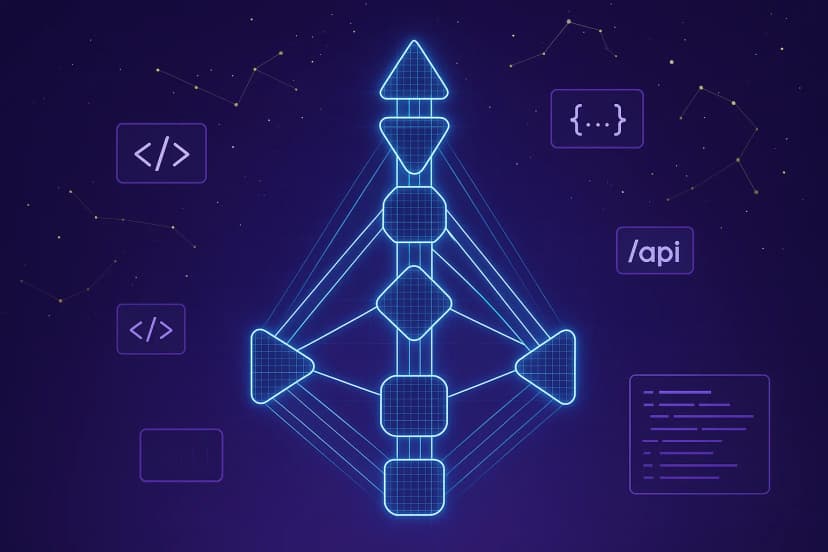
Users expect to see the classic bodygraph visualization. This requires:
- Positioning 9 centers in their traditional layout
- Drawing 36 channels connecting appropriate centers
- Color-coding definitions: Personality (black/red), Design (red), and bridges (striped)
- Gate number placement at channel endpoints
- Line/hexline indicators showing specific gate lines
Performance Considerations
Human Design calculations involve:
- Ephemeris lookups for 13 celestial bodies (Sun, Moon, Mercury through Pluto, plus Nodes)
- Two calculations per body (Personality and Design dates)
- Gate mapping and channel detection
- Type determination algorithm
- Potentially compatibility calculations involving two charts
- Ephemeris Caching: Pre-calculate planetary positions for common date ranges
- Gate Boundary Tables: Pre-compute zodiac-to-gate mappings to avoid repeated trigonometry
- Lazy Channel Detection: Only calculate channels when needed for display or compatibility
- Response Time Target: Under 300ms for single chart, under 500ms for compatibility
Common Implementation Mistakes
After reviewing dozens of Human Design apps, these are the patterns we see repeatedly:
Mistake 1: Trusting Online Calculator Results
Many developers validate their implementation against free online calculators. Problem: those calculators often have errors too. We've found 1-2 gate discrepancies in several popular tools, especially for:
- Design date calculations (the 88° arc)
- Slow-moving planets (Pluto positions can be off by days in some tools)
- Birth times near midnight (timezone handling)
Mistake 2: Ignoring Hexlines
Many apps only show gate numbers (e.g., "Gate 34") without the hexline (e.g., "Gate 34.2"). This loses critical information:
- Each gate has 6 lines with different expressions
- Lines are essential for Profile calculation
- Advanced interpretations depend on line positions
Mistake 3: Simplified Type Determination
Some apps use shortcuts like "has defined Sacral = Generator." This misses:
- Manifesting Generators (motor-to-throat pathway)
- Manifestors with undefined Sacral but motor-to-throat
- Edge cases with multiple motor centers
Mistake 4: Ignoring Design vs Personality Colors
The chart should visually distinguish:
- Personality activations (conscious - typically black)
- Design activations (unconscious - typically red)
- Both activations on same gate (striped or layered)
Many apps just show "defined" vs "undefined" in a single color, losing half the chart's meaning.
Mistake 5: Static Compatibility Algorithms
Some apps use fixed formulas like "5 points per shared gate." Real compatibility is multidimensional:
- Electromagnetic vs composite connections matter differently
- Context (romantic vs business) changes scoring weights
- Some connections that look good create codependency
Build vs API: The Real Calculation
- Ephemeris integration: 2-4 weeks
- Gate mapping and validation: 2-3 weeks
- Type algorithm with edge cases: 1-2 weeks
- Compatibility scoring: 2-4 weeks
- Bodygraph visualization: 2-4 weeks
- Testing and validation: 4-6 weeks
- Total: 4-6 months minimum for production quality
And you still need to:
- Maintain ephemeris data updates
- Handle timezone edge cases worldwide
- Validate against edge cases continuously
- Support multiple languages for interpretations
- Integration: 1-2 days
- UI development: 1-2 weeks
- Testing: 1 week
- Total: 2-4 weeks to production
The API handles all calculation complexity, validation, and edge cases. You focus on user experience and your unique value proposition.
Existing Human Design Software Landscape
Before building, understand what's already out there. Here's how current human design chart generators compare:
- The "official" source, licensed from Ra Uru Hu's estate
- Comprehensive bodygraph chart software with paid readings
- No API access - completely closed system
- Interpretations locked behind expensive subscriptions
- Popular free human design chart generator
- Web-based, no API for developers
- Limited customization options
- Can't integrate into your own app
- Most are consumer-facing websites, not developer tools
- No programmatic access to calculations
- Copy-paste limitations for building apps
- Inconsistent calculation accuracy
- A human design chart API with JSON responses
- Human design chart compatibility calculations
- Bodygraph chart software that integrates with their stack
- White-label options without branding restrictions
Recommended Architecture
Based on our experience, here's what works:
For MVP (Weeks 1-4)
- Use Human Design API for all calculations
- Simple bodygraph display (static SVG)
- Basic interpretation text from API
- Single chart generation focus
For Growth (Months 2-6)
- Add compatibility features
- Interactive bodygraph with hover states
- Transit chart overlays
- User accounts and saved charts
For Scale (Months 6+)
- Personalization engines
- Notification systems for transits
- Community features
- White-label API options
What's Actually Hard
After years in production, here's what actually consumes development time:
Getting Started
If you're ready to build a Human Design app:
-
Define your unique angle: Chart calculation is commodity. What's YOUR differentiation? Compatibility focus? Transit predictions? Professional astrologer tools?
-
Start with API integration: Don't reinvent calculations. Use Human Design API to handle the complex math. Focus your energy on user experience.
-
Validate early: Get your charts in front of Human Design practitioners before launch. They'll find errors you missed.
-
Plan for interpretation depth: Budget significant time/money for interpretive content. Users expect understanding, not just data.
-
Mobile-first design: Most Human Design chart views happen on phones. The bodygraph needs to work on small screens.
Conclusion
Human Design app development is deceptively complex. The system's precision requirements, dual-moment calculations, and interconnected dependencies mean that shortcuts create compounding errors.
The most successful Human Design apps we've seen share common traits:
- They use reliable calculation engines (either battle-tested libraries or APIs)
- They focus development energy on user experience, not reinventing astronomy
- They validate obsessively with knowledgeable practitioners
- They treat interpretation content as a core investment, not an afterthought